The Home Assistant team officially supports Zigbee Home Automation (ZHA integration), the Zigbee stack built into Home Assistant Core.
The Zigbee2MQTT (Z2M) project does also have official compatibility with Silicon Labs radios like Home Assistant Connect ZBT-1 (or Home Assistant SkyConnect, if you have that variant) when using EmberZNet Zigbee firmware, support questions are then handled via their Zigbee2MQTT community forum (or their community own Discord).
When setting up Zigbee2MQTT with Home Assistant Connect ZBT-1 (or Home Assistant SkyConnect, if you have that variant), you will need to configure the adapter type in Zigbee2MQTT. With the following settings, Zigbee2MQTT is known to work with Home Assistant Connect ZBT-1 (or Home Assistant SkyConnect, if you have that variant), make sure the following is present in your Zigbee2MQTT configuration:
Note: The Zigbee Home Automation integration is active in Home Assistant by default! If you are using Zigbee2MQTT with Home Assistant, remember to delete and ignore the discovered Zigbee Home Automation integration in Home Assistant to avoid interference.
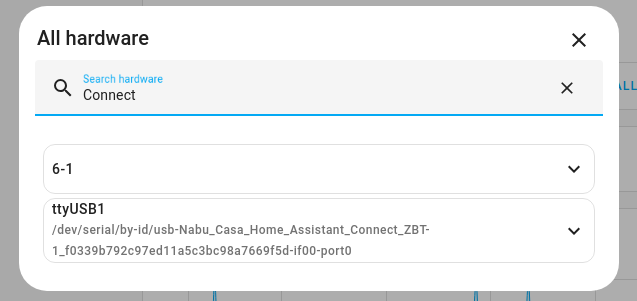
After copying the example below, replace the <usb-serial-number> placeholder with the actual serial number.
You can find the port information under Settings > System > Hardware, then on the menu button, select All Hardware and search for Connect.
serial:
  adapter: ember
  port: /dev/serial/by-id/usb-Nabu_Casa_SkyConnect_v1.0_<usb-serial-number>-if00-port0
  baudrate: 115200
  rtscts: true